Microsoft Surface Go 3 vs Samsung Galaxy Tab A9+
The Verdict
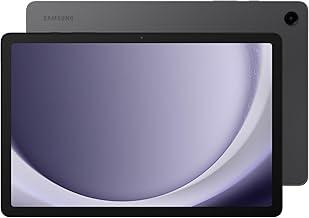
Microsoft Surface Go 3 excels as a productivity-focused device with Windows 11, Surface Pen support, and kickstand versatility, making it ideal for work and creative tasks despite its premium pricing. Samsung Galaxy Tab A9+ delivers superior value with a larger 11-inch 90Hz display, longer battery life (15W fast charging), and lighter build at $219.99. Performance-wise, the Go 3's Intel processors outclass the Snapdragon 695 for desktop applications, but the Tab A9+ handles everyday Android tasks smoothly. Display refresh rate favors Samsung's 90Hz panel over the Go 3's 60Hz, while Windows 11 provides unmatched software flexibility versus One UI's app-centric approach. Budget-conscious consumers seeking a multimedia tablet should choose the Galaxy Tab A9+; professionals requiring laptop-like functionality will appreciate the Surface Go 3's ecosystem, despite the $180 premium.
Who Should Buy
Buy the Microsoft Surface Go 3 if…
- →Most portable Windows device at 544 g with built-in kickstand
- →Full Windows 11 runs desktop apps not available on iPad or Android
- →Affordable entry into the Surface ecosystem at $399
Buy the Samsung Galaxy Tab A9+ if…
- →Affordable price under $220
- →Smooth 90Hz 11-inch display
- →Quad Dolby Atmos speakers
Category Scores
Pros & Cons
Microsoft Surface Go 3
Pros
- Most portable Windows device at 544 g with built-in kickstand
- Full Windows 11 runs desktop apps not available on iPad or Android
- Affordable entry into the Surface ecosystem at $399
- LTE option for always-connected productivity
- MicroSD expansion and headphone jack included
Cons
- Pentium/i3 processors struggle with anything beyond light tasks
- 64 GB eMMC base storage is painfully slow and limited
- 10.5" screen feels cramped for Windows desktop apps
- 4 GB RAM base model is barely usable with modern Windows
- Type Cover and pen still sold separately
Samsung Galaxy Tab A9+
Pros
- Affordable price under $220
- Smooth 90Hz 11-inch display
- Quad Dolby Atmos speakers
- MicroSD expansion up to 1 TB
- Long Samsung software support window
Cons
- No S Pen support
- Plastic build feels basic
- Only Wi-Fi 5
- Modest Snapdragon 695 chipset
- Slow 15W charging
Full Specifications
| Spec | Microsoft Surface Go 3 | Samsung Galaxy Tab A9+ |
|---|---|---|
| Software | Windows 11 Home (S Mode) / Pro | Android 13 with One UI 5.1 |
| Body | ||
| Weight | 544 g | 480 g |
| Dimensions | 245 x 175 x 8.3 mm | 257.1 x 168.7 x 6.9 mm |
| Battery | ||
| Battery life | Up to 11 hours (typical usage) | 15W fast charging |
| Capacity | 28 Wh | 7040 mAh |
| Display | ||
| Size | 10.5 inches | 11 inches |
| Type | PixelSense IPS | LCD |
| Resolution | 1920 x 1280 | 1920 x 1200 |
| Refresh rate | 60Hz | 90Hz |
| Storage | ||
| Storage options | 64 GB eMMC, 128 GB SSD | 64 GB, 128 GB |
| Expandable storage | ||
| Processor | ||
| RAM | 4 GB / 8 GB | 4 GB / 8 GB |
| Chipset | Intel Pentium Gold 6500Y / Intel Core i3-10100Y (Dual-core) | Qualcomm Snapdragon 695 5G |
| Connectivity | ||
| USB | 1x USB-C | USB-C 2.0 |
| Wi-Fi | Wi-Fi 6 | Wi-Fi 5 |
| Cellular | ||
| Stylus Support | ||
| Cameras | ||
| Rear | — | 8 MP |
| Front camera | — | 5 MP |
Related Comparisons
- Samsung Galaxy Tab A9+ vs Samsung Galaxy Tab S9 FE+
- Samsung Galaxy Tab A9+ vs Samsung Galaxy Tab S7 FE
- Microsoft Surface Go 3 vs Samsung Galaxy Tab S9 FE+
- Microsoft Surface Go 3 vs Samsung Galaxy Tab S7 FE
- Samsung Galaxy Tab A9+ vs Lenovo Tab P11 (2nd Gen)
- Microsoft Surface Go 3 vs Lenovo Tab P11 (2nd Gen)
This comparison is based on verified manufacturer specifications covering display, performance, camera, battery, and build quality. Scores are generated by analyzing specs across weighted categories on a 10-point scale. Learn more about our methodology.
Explore more in tablets, see all Microsoft products or all Samsung products. View full details for the Microsoft Surface Go 3 or the Samsung Galaxy Tab A9+.