Microsoft Surface Pro 8 vs Samsung Galaxy Tab S8+

The Verdict
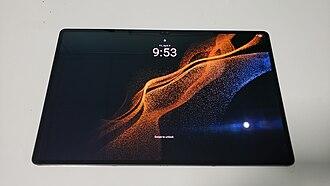
Both tablets excel in different contexts. Microsoft Surface Pro 8 runs full Windows 11 with Intel 11th-gen processors, making it ideal for productivity and desktop-class applications,the 2880×1920 PixelSense display and Thunderbolt 4 connectivity define a premium 2-in-1 experience. Samsung Galaxy Tab S8+ counters with superior aesthetics: weighing just 567g versus 891g, its 12.4-inch Super AMOLED screen delivers vibrant colors, and the included S Pen (versus optional stylus) plus expandable storage via microSD card offer compelling value. Performance-wise, Snapdragon 8 Gen 1 matches or exceeds 11th-gen Intel in mobile tasks. Surface Pro 8 justifies its $200 premium through Windows compatibility and professional software support; Galaxy Tab S8+ wins on portability, display technology, and included accessories. Choose Surface Pro 8 if you need laptop replacement; pick Galaxy Tab S8+ for media consumption and lighter work.
Who Should Buy
Buy the Microsoft Surface Pro 8 if…
- →120Hz display was a major upgrade over Surface Pro 7's 60Hz
- →Thunderbolt 4 ports enable docking and eGPU connectivity
- →Removable SSD for IT-friendly storage swaps
Buy the Samsung Galaxy Tab S8+ if…
- →12.4" Super AMOLED display with vivid colors and deep blacks
- →S Pen included for notes, drawing, and navigation
- →MicroSD expansion up to 1 TB for massive media libraries
Category Scores
Pros & Cons
Microsoft Surface Pro 8
Pros
- 120Hz display was a major upgrade over Surface Pro 7's 60Hz
- Thunderbolt 4 ports enable docking and eGPU connectivity
- Removable SSD for IT-friendly storage swaps
- Slim bezels modernized the Surface Pro design language
- 16-hour battery life is excellent for a Windows tablet
Cons
- 11th gen Intel CPUs feel outdated against 12th/13th gen competitors
- Accessories not included — keyboard and pen cost extra
- No headphone jack removed a basic convenience
- Starts at $1,099 for an i5/8 GB configuration
Samsung Galaxy Tab S8+
Pros
- 12.4" Super AMOLED display with vivid colors and deep blacks
- S Pen included for notes, drawing, and navigation
- MicroSD expansion up to 1 TB for massive media libraries
- In-display fingerprint sensor for seamless unlocking
- Samsung DeX for desktop-mode productivity
Cons
- Snapdragon 8 Gen 1 throttles under heavy sustained workloads
- Android tablet apps remain inconsistent compared to iPadOS
- $899 starting price competes with laptops
- No headphone jack on this model
Full Specifications
| Spec | Microsoft Surface Pro 8 | Samsung Galaxy Tab S8+ |
|---|---|---|
| Software | Windows 11 Home / Pro | Android 12 (One UI 4.1, upgradable to One UI 6+) |
| Body | ||
| Weight | 891 g | 567 g (Wi-Fi) |
| Dimensions | 287 x 208 x 9.3 mm | 285 x 185 x 5.7 mm |
| Battery | ||
| Battery life | Up to 16 hours (typical usage) | Up to 13 hours video playback |
| Capacity | 51.5 Wh | 10090 mAh |
| Display | ||
| Size | 13 inches | 12.4 inches |
| Type | PixelSense Flow IPS | Super AMOLED |
| Resolution | 2880 x 1920 | 2800 x 1752 |
| Refresh rate | 120Hz | 120Hz |
| Storage | ||
| Storage options | 128 GB, 256 GB, 512 GB, 1 TB | 128 GB, 256 GB |
| Expandable storage | ||
| Processor | ||
| RAM | 8 GB / 16 GB / 32 GB | 8 GB |
| Chipset | Intel Core i5-1135G7 / i7-1185G7 (11th Gen, Quad-core) | Qualcomm Snapdragon 8 Gen 1 (Octa-core, Adreno 730) |
| Connectivity | ||
| USB | 2x Thunderbolt 4 USB-C | USB-C 3.2 |
| Wi-Fi | Wi-Fi 6 | Wi-Fi 6E |
| Cellular | ||
| Stylus Support | ||
Related Comparisons
This comparison is based on verified manufacturer specifications covering display, performance, camera, battery, and build quality. Scores are generated by analyzing specs across weighted categories on a 10-point scale. Learn more about our methodology.
Explore more in tablets, see all Microsoft products or all Samsung products. View full details for the Microsoft Surface Pro 8 or the Samsung Galaxy Tab S8+.