Lenovo ThinkPad X1 Carbon Gen 11 vs Microsoft Surface Laptop 7
The Verdict
Lenovo's ThinkPad X1 Carbon Gen 11 offers superior display options with its optional OLED panel delivering 90Hz refresh rates and exceptional color accuracy, paired with Intel's 13th Gen processors for strong x86 application performance. Microsoft's Surface Laptop 7 counters with Qualcomm's Snapdragon X Elite providing exceptional battery life (20 hours versus 10-15 hours), a brighter 600-nit touchscreen, and lower entry price at $999.99. The ThinkPad excels for demanding creative work and legacy software compatibility, while the Surface Laptop 7 prioritizes portability and all-day battery with ARM-based efficiency. Business users valuing performance and port flexibility should choose the ThinkPad Gen 11; ultraportable users seeking maximum battery life and touchscreen convenience will prefer the Surface Laptop 7.
Who Should Buy
Buy the Lenovo ThinkPad X1 Carbon Gen 11 if…
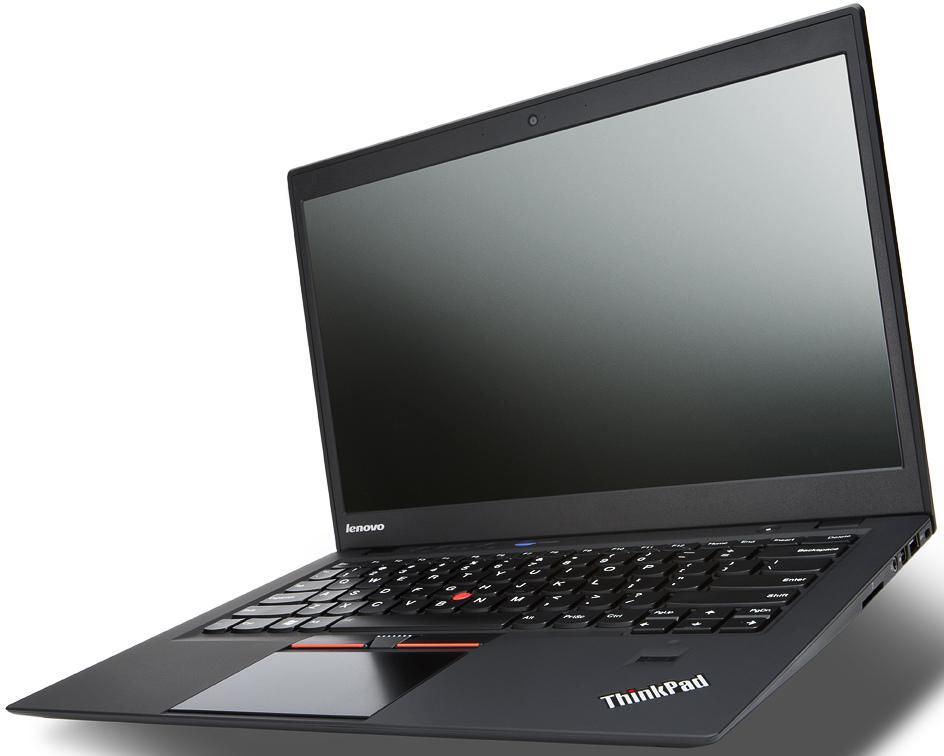
- →Incredibly light at 1.12 kg — ideal for travel
- →Optional 2.8K OLED display is stunning for media and creative work
- →Best-in-class ThinkPad keyboard with excellent key travel
Buy the Microsoft Surface Laptop 7 if…
- →Outstanding battery life on Snapdragon X Elite
- →Bright 600-nit 120Hz touch display
- →Cool, near-silent operation under typical load
Category Scores
Pros & Cons
Lenovo ThinkPad X1 Carbon Gen 11
Pros
- Incredibly light at 1.12 kg — ideal for travel
- Optional 2.8K OLED display is stunning for media and creative work
- Best-in-class ThinkPad keyboard with excellent key travel
- MIL-STD 810H tested for ruggedness and durability
- Good port selection includes USB-A, HDMI, and Thunderbolt 4
Cons
- OLED option significantly reduces battery life to around 10 hours
- 60Hz IPS panel feels behind the times
- Starting price of $1449 is expensive for the base config
- Soldered RAM limits upgradeability
- Integrated graphics only — not suitable for GPU-heavy workloads
Microsoft Surface Laptop 7
Pros
- Outstanding battery life on Snapdragon X Elite
- Bright 600-nit 120Hz touch display
- Cool, near-silent operation under typical load
- Premium aluminum build with great trackpad
Cons
- ARM architecture causes some app compatibility issues
- No Thunderbolt support on USB-C ports
- Limited gaming due to GPU and emulation overhead
- Replaceable SSD but no other internal upgrades
Full Specifications
| Spec | Lenovo ThinkPad X1 Carbon Gen 11 | Microsoft Surface Laptop 7 |
|---|---|---|
| Software | Windows 11 Pro | Windows 11 Home |
| Body | ||
| Weight | 1.12 kg | 1.34 kg |
| Material | Carbon fiber and magnesium alloy | Aluminum |
| Dimensions | 315.6 x 222.5 x 15.36 mm | 301 x 220 x 17.5 mm |
| Ports | ||
| HDMI | 1 | 0 |
| USB-A ports | 2 | 1 |
| Thunderbolt ports | 2 | 0 |
| Headphone Jack | — | |
| USB-C ports | — | 2 |
| SD card | — | |
| Battery | ||
| Battery life | Up to 15 hours (IPS) / 10 hours (OLED) | Up to 20 hours |
| Capacity | 57 Wh | 54 Wh |
| Display | ||
| Size | 14 inches | 13.8 inches |
| Type | OLED (IPS optional) | PixelSense touchscreen, IPS |
| Resolution | 2880 x 1800 | 2304 x 1536 |
| Refresh rate | 60Hz (90Hz OLED) | 120Hz |
| Brightness (nits) | 500 | 600 |
| Storage | ||
| SSD | 512 GB / 1 TB PCIe Gen 4 NVMe | 256 GB |
| Expandable storage | ||
| Keyboard | ||
| Backlit | ||
| Processor | ||
| RAM | 16 GB / 32 GB LPDDR5x | 16 GB LPDDR5X |
| Cores | 10-core (2P + 8E) / 14-core (6P + 8E) | 12 cores |
| Chipset | 13th Gen Intel Core i7-1365U / i7-1370P | Qualcomm Snapdragon X Elite X1E-80-100 |
Related Comparisons
- Microsoft Surface Laptop 7 vs Microsoft Surface Laptop 5
- Microsoft Surface Laptop 7 vs LG gram 14 (2024)
- Microsoft Surface Laptop 7 vs Lenovo Yoga Slim 7 Gen 8 14"
- Lenovo ThinkPad X1 Carbon Gen 11 vs Samsung Galaxy Book5 Pro
- Lenovo ThinkPad X1 Carbon Gen 11 vs Samsung Galaxy Book4 Ultra
- Lenovo ThinkPad X1 Carbon Gen 11 vs Samsung Galaxy Book4 Pro 360
This comparison is based on verified manufacturer specifications covering display, performance, camera, battery, and build quality. Scores are generated by analyzing specs across weighted categories on a 10-point scale. Learn more about our methodology.
Explore more in laptops, see all Lenovo products or all Microsoft products. View full details for the Lenovo ThinkPad X1 Carbon Gen 11 or the Microsoft Surface Laptop 7.