Infinix Xpad 30 Pro vs Microsoft Surface Go 3

How They Compare
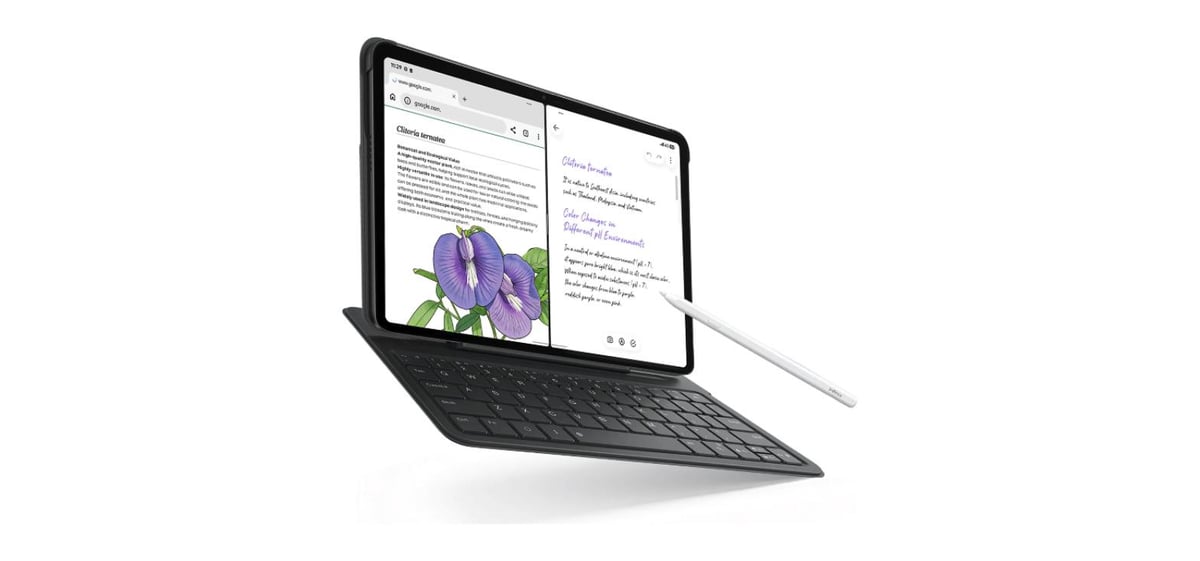
The Infinix Xpad 30 Pro and Microsoft Surface Go 3 sit in the same category, and on the specifications this page can rank they do not come out level. The Infinix Xpad 30 Pro is the cheaper of the two at $196 versus $399, a difference of about $203. The spec table below ranks 5 of their differences, and every one of them goes to the Infinix Xpad 30 Pro — including screen size (11-inch vs 10.5 inches) and refresh rate (up to 90Hz vs 60Hz). The Infinix Xpad 30 Pro is the newer of the two, released in 2026 against 2021. The pros lists below lead with — Infinix Xpad 30 Pro: Stylus and keyboard included at $196; Microsoft Surface Go 3: Most portable Windows device at 544 g with built-in kickstand. Use the side-by-side spec table below to compare display, processor, battery and storage in detail and decide which one fits your priorities.
Who Should Buy
Buy the Infinix Xpad 30 Pro if…
- →Stylus and keyboard included at $196
- →2.5K IGZO panel at 90Hz
- →8,200 mAh with 21.5 hours of rated video
Buy the Microsoft Surface Go 3 if…
- →Most portable Windows device at 544 g with built-in kickstand
- →Full Windows 11 runs desktop apps not available on iPad or Android
- →Affordable entry into the Surface ecosystem at $399
Pros & Cons
Infinix Xpad 30 Pro
Pros
- Stylus and keyboard included at $196
- 2.5K IGZO panel at 90Hz
- 8,200 mAh with 21.5 hours of rated video
- 6.6mm thick at 476g
- microSD expansion to 2TB
Cons
- Helio G200 is modest for heavy multitasking
- 18W charging is slow for a 8,200 mAh cell
- 4G only, no 5G or Wi-Fi 6
- 550 nits limits outdoor use
Microsoft Surface Go 3
Pros
- Most portable Windows device at 544 g with built-in kickstand
- Full Windows 11 runs desktop apps not available on iPad or Android
- Affordable entry into the Surface ecosystem at $399
- LTE option for always-connected productivity
- MicroSD expansion and headphone jack included
Cons
- Pentium/i3 processors struggle with anything beyond light tasks
- 64 GB eMMC base storage is painfully slow and limited
- 10.5" screen feels cramped for Windows desktop apps
- 4 GB RAM base model is barely usable with modern Windows
- Type Cover and pen still sold separately
Full Specifications
| Spec | Infinix Xpad 30 Pro | Microsoft Surface Go 3 |
|---|---|---|
| Software | XOS 16 on Android 16 | Windows 11 Home (S Mode) / Pro |
| Body | ||
| Colors | Twilight Purple, Anthracite Grey, Titanium Silver | — |
| Weight | 476g | 544 g |
| Dimensions | — | 245 x 175 x 8.3 mm |
| Battery | ||
| Capacity | 8200 mAh | 28 Wh |
| Charging | 18W wired | — |
| Battery life | — | Up to 11 hours (typical usage) |
| Cameras | ||
| Rear | 8MP | — |
| Front camera | 8MP | — |
| Display | ||
| Overview | 11-inch IGZO, 2560 x 1600 | — |
| Size | 11-inch | 10.5 inches |
| Resolution | 2560 x 1600 | 1920 x 1280 |
| Refresh rate | up to 90Hz | 60Hz |
| Brightness (nits) | 500 nits (typ), 550 nits (Max) | — |
| Type | — | PixelSense IPS |
| Storage | ||
| Overview | 256GB UFS 2.2, microSD to 2TB | — |
| Storage options | 256GB | 64 GB eMMC, 128 GB SSD |
| Expandable storage | ||
| Included | X Pencil 20 stylus, X KeyBoard 11 | — |
| Speakers | dual with DTS | — |
| Processor | ||
| RAM | up to 8GB plus 8GB extended | 4 GB / 8 GB |
| Chipset | MediaTek Helio G200 Ultimate | Intel Pentium Gold 6500Y / Intel Core i3-10100Y (Dual-core) |
| Thickness | 6.6mm | — |
| Connectivity | ||
| Overview | 4G LTE | — |
| Cellular | ||
| USB | — | 1x USB-C |
| Wi-Fi | — | Wi-Fi 6 |
| Video Playback | up to 21.5 hours | — |
| Stylus Support | Not stated | |
Want to compare a third product?
Add another product for a 3-way comparison.
Related Comparisons
Explore more in tablets, see all Infinix products or all Microsoft products. View full details for the Infinix Xpad 30 Pro or the Microsoft Surface Go 3.