Dell Alienware m18 vs MSI Raider GE78 HX

The Verdict
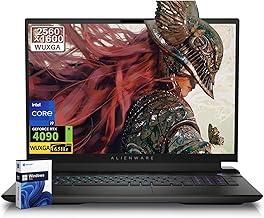
Both gaming laptops deliver impressive performance, but they target different priorities. Dell's Alienware m18 excels with its larger 18-inch 2560x1600 165Hz IPS display, ideal for competitive gaming and productivity, paired with an Intel Core i9-13980HX, 32GB DDR5, and 1TB SSD at $2,099. MSI's Raider GE78 HX justifies its $2,999 premium through a cutting-edge 17.3-inch 4K Mini-LED display with 1000 nits brightness, superior color accuracy, 64GB DDR5 RAM, 2TB storage, and the newer 14th-gen i9-14900HX processor. The Raider is 2.16 lbs lighter and offers professional-grade display quality, while the Alienware provides better value and higher refresh rates for esports. Choose the MSI for content creation and premium features; select the Dell for gaming performance and budget consciousness.
Who Should Buy
Buy the Dell Alienware m18 if…
- →Massive 18-inch QHD+ 165Hz display is immersive for gaming
- →RTX 4090 Laptop GPU option for desktop-class gaming performance
- →i9-13980HX is one of the fastest mobile processors available
Buy the MSI Raider GE78 HX if…
- →RTX 4090 Laptop GPU with full 175W TDP for maximum gaming performance
- →4K Mini-LED display with 1000-nit HDR is stunning for content creation
- →64 GB DDR5 RAM handles any workload out of the box
Category Scores
Pros & Cons
Dell Alienware m18
Pros
- Massive 18-inch QHD+ 165Hz display is immersive for gaming
- RTX 4090 Laptop GPU option for desktop-class gaming performance
- i9-13980HX is one of the fastest mobile processors available
- Full-size keyboard with numpad and per-key RGB lighting
- Excellent thermal design with Cryo-Tech cooling keeps temps in check
Cons
- Almost 9 lbs — this is essentially a desktop replacement
- 5-hour battery life means the charger is mandatory
- Power brick is enormous and heavy
- 300-nit display brightness is dim for a premium gaming laptop
- Extremely expensive with high-end GPU configurations
MSI Raider GE78 HX
Pros
- RTX 4090 Laptop GPU with full 175W TDP for maximum gaming performance
- 4K Mini-LED display with 1000-nit HDR is stunning for content creation
- 64 GB DDR5 RAM handles any workload out of the box
- 2 TB storage with room for additional NVMe drives
- Comprehensive port selection including Thunderbolt 4
Cons
- Nearly 7 lbs — this is a desktop replacement, not a portable
- 5-hour battery life — always tethered to power
- Very expensive at $2,999
- Fan noise is substantial under gaming loads
Full Specifications
| Spec | Dell Alienware m18 | MSI Raider GE78 HX |
|---|---|---|
| Software | Windows 11 Home | Windows 11 Pro |
| Body | ||
| Weight | 8.99 lbs (4.08 kg) | 6.83 lbs (3.1 kg) |
| Material | Aluminum and magnesium alloy | Aluminum |
| Dimensions | 16.19 x 12.41 x 1.05 inches | 15.63 x 11.73 x 1.0 inches |
| Ports | ||
| HDMI | ||
| USB-A ports | 3 | 2 |
| USB-C ports | 2 | 2 |
| SD card | ||
| Thunderbolt ports | 1 | 1 |
| Battery | ||
| Battery life | Up to 5 hours | Up to 5 hours |
| Capacity | 97 Wh | 99.99 Wh |
| Display | ||
| Size | 18 inches | 17.3 inches |
| Type | IPS | Mini-LED IPS |
| Resolution | 2560 x 1600 | 3840 x 2160 |
| Refresh rate | 165Hz | 120Hz |
| Brightness (nits) | 300 | 1000 |
| Storage | ||
| SSD | 1 TB PCIe Gen 4 NVMe (dual slot) | 2 TB PCIe Gen 4 NVMe |
| Expandable storage | ||
| Keyboard | ||
| Backlit | ||
| Processor | ||
| RAM | 32 GB DDR5 | 64 GB DDR5 |
| Cores | 24 cores (8P + 16E) | 24 cores (8P + 16E) |
| Chipset | Intel Core i9-13980HX (13th Gen) | Intel Core i9-14900HX |
Related Comparisons
- MSI Raider GE78 HX vs ASUS ROG Zephyrus G14 (2023)
- Dell Alienware m18 vs ASUS ROG Zephyrus G14 (2023)
- MSI Raider GE78 HX vs Apple MacBook Pro 16" M2 Pro
- Dell Alienware m18 vs Apple MacBook Pro 16" M2 Pro
- MSI Raider GE78 HX vs Apple MacBook Pro 14" M3 Pro
- Dell Alienware m18 vs Apple MacBook Pro 14" M3 Pro
This comparison is based on verified manufacturer specifications covering display, performance, camera, battery, and build quality. Scores are generated by analyzing specs across weighted categories on a 10-point scale. Learn more about our methodology.
Explore more in laptops, see all Dell products or all MSI products. View full details for the Dell Alienware m18 or the MSI Raider GE78 HX.
Press ? for keyboard shortcuts