ASUS ZenBook 14 OLED (UX3405, 2024) vs HP Chromebook Plus x360 14

The Verdict
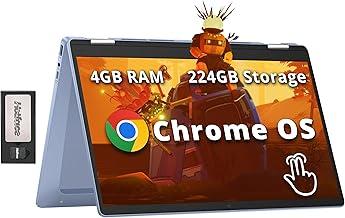
ASUS ZenBook 14 OLED dominates this comparison with its premium 2880x1800 OLED display delivering exceptional color accuracy and contrast at 600 nits brightness, paired with Intel's powerful Core Ultra 7 155H processor and 16GB RAM for demanding creative work. HP Chromebook Plus x360 offers a practical alternative at one-third the price, featuring a solid 1920x1200 IPS touchscreen, lightweight 1.52kg design, and ChromeOS simplicity ideal for everyday browsing and productivity. Battery life favors ASUS with an impressive 18-hour claim versus HP's 12 hours. Storage disparity is significant: 1TB versus 256GB. For professionals requiring photo/video editing, development, or demanding applications, ASUS is the clear choice. Students and casual users seeking affordability and portability should consider the Chromebook. ASUS ZenBook 14 OLED is the superior all-around machine despite its premium pricing.
Who Should Buy
Buy the ASUS ZenBook 14 OLED (UX3405, 2024) if…
- →Stunning 3K 120Hz OLED display
- →Exceptionally lightweight at 1.2 kg
- →Strong battery life for an OLED laptop
Buy the HP Chromebook Plus x360 14 if…
- →Google's Chromebook Plus standard guarantees AI features and performance minimums
- →360-degree hinge for laptop, tent, and tablet modes
- →12-hour battery life handles a full school or work day
Category Scores
Pros & Cons
ASUS ZenBook 14 OLED (UX3405, 2024)
Pros
- Stunning 3K 120Hz OLED display
- Exceptionally lightweight at 1.2 kg
- Strong battery life for an OLED laptop
- Premium aluminum chassis with MIL-STD durability
- Fast Intel Core Ultra performance with NPU for AI
Cons
- RAM is soldered and not upgradeable
- Only one USB-A port
- No SD card reader
- Webcam quality is mediocre
HP Chromebook Plus x360 14
Pros
- Google's Chromebook Plus standard guarantees AI features and performance minimums
- 360-degree hinge for laptop, tent, and tablet modes
- 12-hour battery life handles a full school or work day
- Aluminum build feels premium for a Chromebook
- ChromeOS is fast, secure, and auto-updating
Cons
- 8 GB RAM and 256 GB storage is not expandable
- ChromeOS can't run traditional Windows apps
- No HDMI port — USB-C to HDMI adapter needed
- 60Hz FHD+ display is basic compared to similarly-priced Windows laptops
Full Specifications
| Spec | ASUS ZenBook 14 OLED (UX3405, 2024) | HP Chromebook Plus x360 14 |
|---|---|---|
| Software | Windows 11 Home | ChromeOS |
| Body | ||
| Weight | 1.2 kg | 3.35 lbs (1.52 kg) |
| Material | Aluminum | Aluminum |
| Dimensions | 312.4 x 220.1 x 14.9 mm | 12.73 x 8.86 x 0.7 inches |
| Ports | ||
| HDMI | 1 | |
| USB-A ports | 1 | 1 |
| USB-C ports | 0 | 2 |
| SD card | ||
| Thunderbolt ports | 2 | — |
| Battery | ||
| Battery life | Up to 18 hours | Up to 12 hours |
| Capacity | 75 Wh | 56 Wh |
| Display | ||
| Size | 14 inches | 14 inches |
| Type | OLED, 16:10, touch optional | IPS touchscreen |
| Resolution | 2880 x 1800 | 1920 x 1200 |
| Refresh rate | 120Hz | 60Hz |
| Brightness (nits) | 600 | 300 |
| Storage | ||
| SSD | 1 TB PCIe 4.0 NVMe | 256 GB UFS |
| Expandable storage | ||
| Keyboard | ||
| Backlit | ||
| Processor | ||
| RAM | 16 GB LPDDR5X | 8 GB LPDDR5 |
| Cores | 16 cores (6P+8E+2LPE) | 8 cores (8E) |
| Chipset | Intel Core Ultra 7 155H | Intel Core i3-N305 |
Related Comparisons
- HP Chromebook Plus x360 14 vs MSI Thin GF63
- HP Chromebook Plus x360 14 vs Microsoft Surface Laptop 5
- HP Chromebook Plus x360 14 vs LG gram 14 (2024)
- HP Chromebook Plus x360 14 vs Lenovo Yoga Slim 7 Gen 8 14"
- HP Chromebook Plus x360 14 vs Lenovo ThinkPad X1 Carbon Gen 11
- HP Chromebook Plus x360 14 vs Lenovo Legion Go
This comparison is based on verified manufacturer specifications covering display, performance, camera, battery, and build quality. Scores are generated by analyzing specs across weighted categories on a 10-point scale. Learn more about our methodology.
Explore more in laptops, see all ASUS products or all HP products. View full details for the ASUS ZenBook 14 OLED (UX3405, 2024) or the HP Chromebook Plus x360 14.