ASUS ROG Zephyrus G14 (2023) vs Lenovo IdeaPad Pro 5i 16

The Verdict
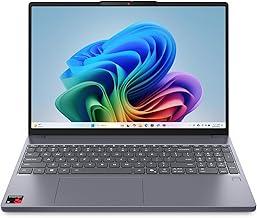
ASUS ROG Zephyrus G14 dominates in display quality with its 1100-nit Mini-LED screen and 165Hz refresh rate, ideal for creative work and gaming. Performance-wise, the Ryzen 9 7940HS with RTX 4060 slightly edges the Intel Core Ultra 7 155H for GPU-intensive tasks, though both handle productivity well. Lenovo IdeaPad Pro 5i 16 offers a larger 16-inch screen, lighter weight at 1.98kg versus 1.72kg, and superior battery life at 11 hours. The ASUS costs $600 more while delivering exceptional display technology and gaming capabilities. Budget-conscious professionals prioritizing screen size should consider the Lenovo, but creators and gamers seeking premium visuals and portable performance will find the ASUS ROG's investment worthwhile.
Who Should Buy
Buy the ASUS ROG Zephyrus G14 (2023) if…
- →Mini-LED display with 1100-nit HDR brightness is stunning for gaming
- →165Hz refresh rate with QHD+ resolution for sharp, smooth gameplay
- →RTX 4060 handles most modern games at high settings
Buy the Lenovo IdeaPad Pro 5i 16 if…
- →Strong Intel Core Ultra 7 performance at an accessible price
- →2.5K 120Hz IPS display is excellent for the tier
- →Full port suite including SD card and USB-A
Category Scores
Pros & Cons
ASUS ROG Zephyrus G14 (2023)
Pros
- Mini-LED display with 1100-nit HDR brightness is stunning for gaming
- 165Hz refresh rate with QHD+ resolution for sharp, smooth gameplay
- RTX 4060 handles most modern games at high settings
- Compact 14-inch form factor is portable for a gaming laptop
- Large 76 Wh battery provides good endurance for light use
Cons
- Fan noise is significant under heavy gaming loads
- No webcam or very basic webcam depending on configuration
- 1.72 kg is heavy for a 14-inch ultraportable
- No Thunderbolt — USB-C ports are USB 3.2 only
- RTX 4060 is limited to 8 GB VRAM for future-proofing
Lenovo IdeaPad Pro 5i 16
Pros
- Strong Intel Core Ultra 7 performance at an accessible price
- 2.5K 120Hz IPS display is excellent for the tier
- Full port suite including SD card and USB-A
- Upgradeable RAM and SSD
- 84 Wh battery supports all-day use
Cons
- Plastic base panel feels less premium
- Display brightness of 350 nits is modest
- No discrete GPU on base model
- Fans audible under sustained workloads
- Heavier than comparable ultrabooks
Full Specifications
| Spec | ASUS ROG Zephyrus G14 (2023) | Lenovo IdeaPad Pro 5i 16 |
|---|---|---|
| Software | Windows 11 | Windows 11 Home |
| Gpu | NVIDIA GeForce RTX 4060 (8 GB) | — |
| Body | ||
| Weight | 1.72 kg | 1.98 kg |
| Material | Aluminum alloy | Aluminum lid with plastic base |
| Dimensions | 312 x 227 x 19.5 mm | 356.2 x 248.2 x 18.9 mm |
| Ports | ||
| HDMI | 1 | 1 |
| USB-A ports | 2 | 2 |
| USB-C ports | 2 | 1 |
| Headphone Jack | — | |
| SD card | — | |
| Thunderbolt ports | — | 1 |
| Battery | ||
| Battery life | Up to 10 hours | Up to 11 hours mixed use |
| Capacity | 76 Wh | 84 Wh |
| Display | ||
| Size | 14 inches | 16.0 inches |
| Type | Mini-LED IPS (Nebula HDR) | 2.5K IPS anti-glare |
| Resolution | 2560 x 1600 | 2560 x 1600 |
| Refresh rate | 165Hz | 120Hz |
| Brightness (nits) | 1100 | 350 |
| Storage | ||
| SSD | 1 TB PCIe Gen 4 NVMe | 512 GB NVMe |
| Expandable storage | ||
| Keyboard | ||
| Backlit | ||
| Touch Bar | — | |
| Processor | ||
| RAM | 16 GB / 32 GB DDR5 | 16 GB DDR5 |
| Cores | 8-core / 16-thread | 16-core (6P+8E+2LPE) |
| Chipset | AMD Ryzen 9 7940HS | Intel Core Ultra 7 155H |
Related Comparisons
- Lenovo IdeaPad Pro 5i 16 vs Microsoft Surface Laptop 5
- Lenovo IdeaPad Pro 5i 16 vs LG gram 14 (2024)
- Lenovo IdeaPad Pro 5i 16 vs Lenovo Yoga Slim 7 Gen 8 14"
- Lenovo IdeaPad Pro 5i 16 vs Lenovo ThinkPad X1 Carbon Gen 11
- Lenovo IdeaPad Pro 5i 16 vs HP Spectre x360 14 (2023)
- Lenovo IdeaPad Pro 5i 16 vs HP Envy x360 14 (2024)
This comparison is based on verified manufacturer specifications covering display, performance, camera, battery, and build quality. Scores are generated by analyzing specs across weighted categories on a 10-point scale. Learn more about our methodology.
Explore more in laptops, see all ASUS products or all Lenovo products. View full details for the ASUS ROG Zephyrus G14 (2023) or the Lenovo IdeaPad Pro 5i 16.
Press ? for keyboard shortcuts