Acer Swift Go 16 (SFG16-72, 2024) vs Lenovo ThinkPad X1 Carbon Gen 13

The Verdict
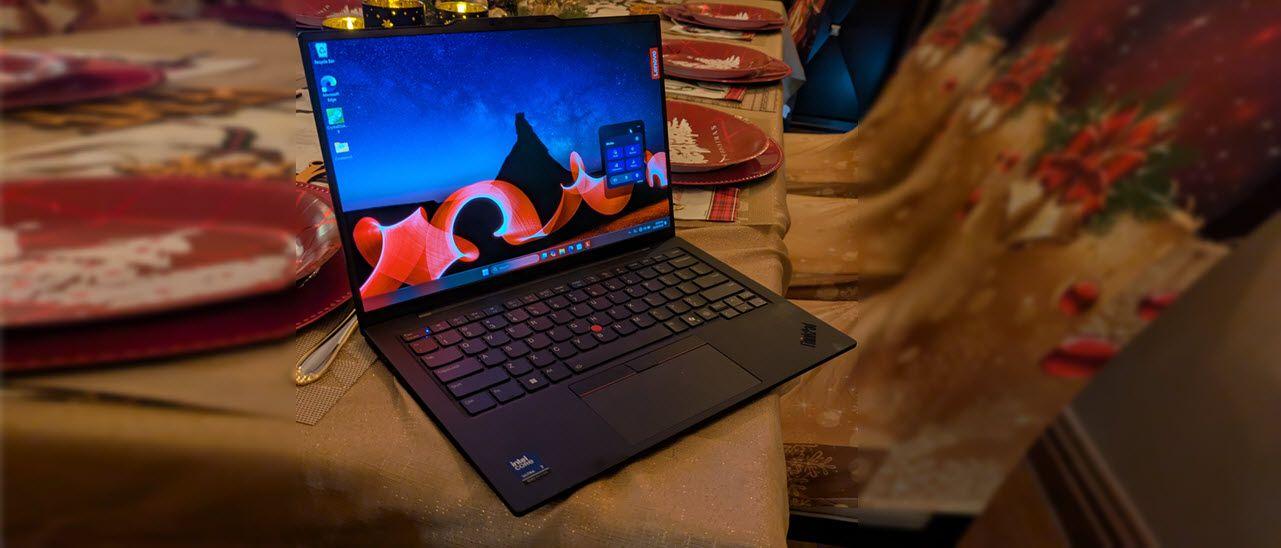
Acer's Swift Go 16 delivers exceptional value at $899, pairing a stunning 16-inch OLED display (3200x2000, 120Hz) with robust performance from the Core Ultra 7 155H and 16GB LPDDR5X RAM. Its 1.5kg weight and 12.5-hour battery life make it surprisingly portable for the screen size, though the 1TB SSD and dual Thunderbolt ports add practical appeal. Lenovo's ThinkPad X1 Carbon Gen 13 commands premium pricing ($1449) for a lighter 1.12kg chassis, superior 15-hour battery, and professional-grade build quality with carbon fiber construction. However, its smaller 14-inch IPS display (1920x1200, 60Hz) and less powerful Core Ultra 7 265V processor feel underwhelming at this price point. The X1 Carbon targets business users prioritizing portability and keyboard comfort, while Swift Go 16 offers better specs and display technology for creators and general users. Swift Go 16 emerges as the stronger choice unless portability to 1.1kg is essential.
Who Should Buy
Buy the Acer Swift Go 16 (SFG16-72, 2024) if…
- →Sharp 3.2K 120Hz OLED display
- →Affordable for a Core Ultra OLED laptop
- →Generous port selection including SD card reader
Buy the Lenovo ThinkPad X1 Carbon Gen 13 if…
- →Intel Core Ultra 7 with NPU for on-device AI processing
- →Under 2.5 lbs — one of the lightest 14-inch business laptops
- →ThinkPad keyboard remains the gold standard for typing
Category Scores
Pros & Cons
Acer Swift Go 16 (SFG16-72, 2024)
Pros
- Sharp 3.2K 120Hz OLED display
- Affordable for a Core Ultra OLED laptop
- Generous port selection including SD card reader
- Lightweight for a 16-inch laptop
- Solid 1080p IR webcam
Cons
- Speakers are merely average
- Display brightness lower than competitors
- Soldered RAM limits upgradability
- Plastic deck flex on the keyboard
Lenovo ThinkPad X1 Carbon Gen 13
Pros
- Intel Core Ultra 7 with NPU for on-device AI processing
- Under 2.5 lbs — one of the lightest 14-inch business laptops
- ThinkPad keyboard remains the gold standard for typing
- MIL-STD-810H durability tested for enterprise reliability
- Built-in HDMI port eliminates the need for dongles
Cons
- FHD+ base display is disappointing at $1,449
- LPDDR5X RAM is soldered — not user-upgradeable
- No SD card reader for photographers
- Intel Core Ultra efficiency modes can occasionally stutter
Full Specifications
| Spec | Acer Swift Go 16 (SFG16-72, 2024) | Lenovo ThinkPad X1 Carbon Gen 13 |
|---|---|---|
| Software | Windows 11 Home | Windows 11 Pro |
| Body | ||
| Weight | 1.5 kg | 2.48 lbs (1.12 kg) |
| Material | Aluminum | Carbon fiber and magnesium |
| Dimensions | 358 x 248.5 x 15.9 mm | 12.4 x 8.76 x 0.59 inches |
| Ports | ||
| HDMI | 1 | |
| USB-A ports | 2 | — |
| USB-C ports | 0 | 2 |
| SD card | ||
| Thunderbolt ports | 2 | 2 |
| Battery | ||
| Battery life | Up to 12.5 hours | Up to 15 hours |
| Capacity | 65 Wh | 57 Wh |
| Display | ||
| Size | 16 inches | 14 inches |
| Type | OLED, 16:10 | IPS anti-glare |
| Resolution | 3200 x 2000 | 1920 x 1200 |
| Refresh rate | 120Hz | 60Hz |
| Brightness (nits) | 400 | 400 |
| Storage | ||
| SSD | 1 TB PCIe 4.0 NVMe | 512 GB PCIe Gen 4 NVMe |
| Expandable storage | ||
| Keyboard | ||
| Backlit | ||
| Processor | ||
| RAM | 16 GB LPDDR5X | 16 GB |
| Cores | 16 cores (6P+8E+2LPE) | 8 cores (4P + 4E) |
| Chipset | Intel Core Ultra 7 155H | Intel Core Ultra 7 265V |
Related Comparisons
- Lenovo ThinkPad X1 Carbon Gen 13 vs Samsung Galaxy Book4 15"
- Lenovo ThinkPad X1 Carbon Gen 13 vs Samsung Galaxy Book3 Ultra
- Lenovo ThinkPad X1 Carbon Gen 13 vs Razer Blade Stealth 13
- Lenovo ThinkPad X1 Carbon Gen 13 vs MSI Prestige 16 Evo
- Lenovo ThinkPad X1 Carbon Gen 13 vs MSI Katana 15
- Lenovo ThinkPad X1 Carbon Gen 13 vs MSI GE76 Raider
This comparison is based on verified manufacturer specifications covering display, performance, camera, battery, and build quality. Scores are generated by analyzing specs across weighted categories on a 10-point scale. Learn more about our methodology.
Explore more in laptops, see all Acer products or all Lenovo products. View full details for the Acer Swift Go 16 (SFG16-72, 2024) or the Lenovo ThinkPad X1 Carbon Gen 13.