Acer Nitro V 15 vs ASUS ProArt StudioBook 16
The Verdict
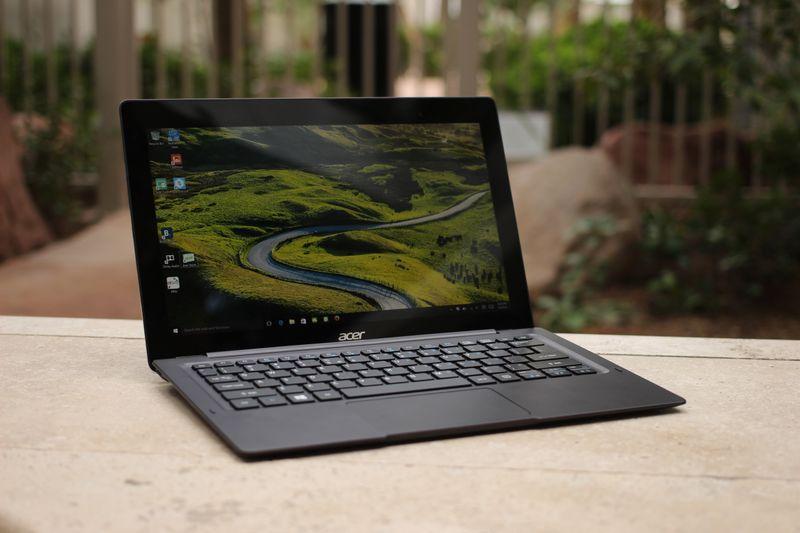
Acer's Nitro V 15 targets budget-conscious gamers with its 144Hz IPS display and Intel Core i5-13420H, delivering solid 1080p gaming performance at an aggressive $699 price point. Battery life reaches 6 hours, though the plastic build feels less premium. ASUS ProArt StudioBook 16 serves professionals with a stunning 3.2K OLED touch display (550 nits), powerhouse Core i9-14900HX processor, 32GB RAM, and superior I/O including Thunderbolt ports. Its aluminum chassis, 8-hour battery, and Windows 11 Pro justify the $2,499 investment for creative workflows. These laptops serve entirely different markets,casual gamers versus creative professionals. For budget gaming, the Nitro V 15 excels; for content creation requiring color accuracy and processing power, the ProArt StudioBook 16 is essential. Choose based on your primary use case rather than direct comparison.
Who Should Buy
Buy the Acer Nitro V 15 if…
- →RTX 4050 Laptop GPU for 1080p gaming at under $700
- →144Hz display is smooth for competitive games
- →Expandable storage and RAM slots for future upgrades
Buy the ASUS ProArt StudioBook 16 if…
- →Factory-calibrated 3.2K OLED display with Pantone validation
- →RTX 4070 handles GPU-intensive creative workloads
- →ASUS Dial rotary knob for creative app control
Category Scores
Pros & Cons
Acer Nitro V 15
Pros
- RTX 4050 Laptop GPU for 1080p gaming at under $700
- 144Hz display is smooth for competitive games
- Expandable storage and RAM slots for future upgrades
- Decent port selection with full-size HDMI
- Most affordable way to get RTX 40-series gaming performance
Cons
- Only 8 GB RAM — should be upgraded to 16 GB
- Plasticky build quality feels budget
- 300-nit display is dim and washes out in bright rooms
- Fan noise is loud during gaming sessions
ASUS ProArt StudioBook 16
Pros
- Factory-calibrated 3.2K OLED display with Pantone validation
- RTX 4070 handles GPU-intensive creative workloads
- ASUS Dial rotary knob for creative app control
- Full port selection including SD card and Thunderbolt
- Windows 11 Pro with professional software bundles
Cons
- High price targets a narrow professional audience
- Heavy at 1.85 kg despite sleek appearance
- Battery life drops under sustained GPU use
- Thunderbolt ports share bandwidth with USB-A
- Runs warm under sustained i9 load
Full Specifications
| Spec | Acer Nitro V 15 | ASUS ProArt StudioBook 16 |
|---|---|---|
| Software | Windows 11 Home | Windows 11 Pro |
| Body | ||
| Weight | 4.85 lbs (2.2 kg) | 1.85 kg |
| Material | Plastic | Anodized aluminum |
| Dimensions | 14.19 x 10.24 x 0.89 inches | 355.4 x 252.1 x 18.9 mm |
| Ports | ||
| HDMI | 1 | |
| USB-A ports | 2 | 3 |
| USB-C ports | 1 | 1 |
| SD card | ||
| Thunderbolt ports | — | 2 |
| Battery | ||
| Battery life | Up to 6 hours | Up to 8 hours mixed use |
| Capacity | 57 Wh | 90 Wh |
| Display | ||
| Size | 15.6 inches | 16.0 inches |
| Type | IPS | 3.2K OLED Pro touch |
| Resolution | 1920 x 1080 | 3200 x 2000 |
| Refresh rate | 144Hz | 120Hz |
| Brightness (nits) | 300 | 550 |
| Storage | ||
| SSD | 512 GB PCIe Gen 4 NVMe | 1 TB NVMe |
| Expandable storage | ||
| Keyboard | ||
| Backlit | ||
| Touch Bar | — | |
| Processor | ||
| RAM | 8 GB DDR5 | 32 GB DDR5 |
| Cores | 8 cores (4P + 4E) | 24-core (8P+16E) |
| Chipset | Intel Core i5-13420H | Intel Core i9-14900HX |
Related Comparisons
- ASUS ProArt StudioBook 16 vs LG gram 14 (2024)
- ASUS ProArt StudioBook 16 vs Lenovo ThinkPad X1 Carbon Gen 11
- ASUS ProArt StudioBook 16 vs HP Spectre x360 14 (2023)
- ASUS ProArt StudioBook 16 vs Dell XPS 14 (2023)
- ASUS ProArt StudioBook 16 vs ASUS ROG Zephyrus G14 (2023)
- ASUS ProArt StudioBook 16 vs Apple MacBook Pro 16" M2 Pro
This comparison is based on verified manufacturer specifications covering display, performance, camera, battery, and build quality. Scores are generated by analyzing specs across weighted categories on a 10-point scale. Learn more about our methodology.
Explore more in laptops, see all Acer products or all ASUS products. View full details for the Acer Nitro V 15 or the ASUS ProArt StudioBook 16.