Acer Nitro V 15 vs Lenovo IdeaPad Pro 5i 16
Acer's Nitro V 15 delivers gaming-focused performance at an aggressive $699 price point, featuring a 144Hz 1080p display paired with an Intel Core i5-13420H and 8GB DDR5 RAM. Lenovo's IdeaPad Pro 5i 16 commands $999 but justifies it with a superior 16-inch 2.5K display (2560x1600), double the RAM (16GB), the newer Intel Core Ultra 7 155H with 16 cores, and substantially longer battery life (11 hours vs 6 hours). Build quality favors Lenovo with its aluminum lid construction. Both offer 512GB storage and backlit keyboards, though Lenovo adds SD card and Thunderbolt support. For gaming and competitive esports, the Nitro V 15's 144Hz refresh rate excels; for productivity, content creation, and everyday use, the IdeaPad Pro 5i 16 provides better longevity, screen real estate, and processing power. Budget gamers should lean Acer; professionals and power users get superior value with Lenovo's more balanced, future-proof package.
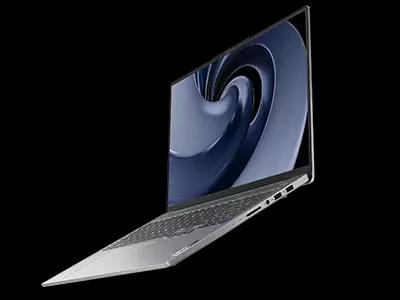
Full Specifications
| Spec | Acer Nitro V 15 | Lenovo IdeaPad Pro 5i 16 |
|---|---|---|
| Software | Windows 11 Home | Windows 11 Home |
| Body | ||
| Weight | 4.85 lbs (2.2 kg) | 1.98 kg |
| Material | Plastic | Aluminum lid with plastic base |
| Dimensions | 14.19 x 10.24 x 0.89 inches | 356.2 x 248.2 x 18.9 mm |
| Ports | ||
| HDMI | 1 | |
| USB-A ports | 2 | 2 |
| USB-C ports | 1 | 1 |
| SD card | ||
| Thunderbolt ports | — | 1 |
| Battery | ||
| Battery life | Up to 6 hours | Up to 11 hours mixed use |
| Capacity | 57 Wh | 84 Wh |
| Display | ||
| Size | 15.6 inches | 16.0 inches |
| Type | IPS | 2.5K IPS anti-glare |
| Resolution | 1920 x 1080 | 2560 x 1600 |
| Refresh rate | 144Hz | 120Hz |
| Brightness (nits) | 300 | 350 |
| Storage | ||
| SSD | 512 GB PCIe Gen 4 NVMe | 512 GB NVMe |
| Expandable storage | ||
| Keyboard | ||
| Backlit | ||
| Touch Bar | — | |
| Processor | ||
| RAM | 8 GB DDR5 | 16 GB DDR5 |
| Cores | 8 cores (4P + 4E) | 16-core (6P+8E+2LPE) |
| Chipset | Intel Core i5-13420H | Intel Core Ultra 7 155H |
Category Scores
Pros & Cons
Acer Nitro V 15
Pros
- RTX 4050 Laptop GPU for 1080p gaming at under $700
- 144Hz display is smooth for competitive games
- Expandable storage and RAM slots for future upgrades
- Decent port selection with full-size HDMI
- Most affordable way to get RTX 40-series gaming performance
Cons
- Only 8 GB RAM — should be upgraded to 16 GB
- Plasticky build quality feels budget
- 300-nit display is dim and washes out in bright rooms
- Fan noise is loud during gaming sessions
Lenovo IdeaPad Pro 5i 16
Pros
- Strong Intel Core Ultra 7 performance at an accessible price
- 2.5K 120Hz IPS display is excellent for the tier
- Full port suite including SD card and USB-A
- Upgradeable RAM and SSD
- 84 Wh battery supports all-day use
Cons
- Plastic base panel feels less premium
- Display brightness of 350 nits is modest
- No discrete GPU on base model
- Fans audible under sustained workloads
- Heavier than comparable ultrabooks
Related Comparisons
- Lenovo IdeaPad Pro 5i 16 vs Apple MacBook Pro 14" M4 Pro
- Lenovo IdeaPad Pro 5i 16 vs Apple MacBook Air 13" M3
- Lenovo IdeaPad Pro 5i 16 vs Dell XPS 16 (9640)
- Lenovo IdeaPad Pro 5i 16 vs Dell XPS 14 (9440)
- Lenovo IdeaPad Pro 5i 16 vs Lenovo IdeaPad Slim 5 16 (2024)
- Lenovo IdeaPad Pro 5i 16 vs HP Spectre x360 16 (2024)
Explore more in laptops, see all Acer products or all Lenovo products. View full details for the Acer Nitro V 15 or the Lenovo IdeaPad Pro 5i 16.